System.ArgumentNullException: Value cannot be null.
Parameter name: source
   at System.Linq.Enumerable.Any[TSource](IEnumerable`1 source)
   at musicMagpie.Basket.Helpers.BasketHelper.AllTechItems() in D:\a\1\s\musicMagpie.Core\Helpers\BasketHelper.cs:line 855
   at ASP._Page_Views_Partials_ContentElements_ProductsSearchForm_cshtml.Execute() in C:\home\site\wwwroot\Views\Partials\ContentElements\ProductsSearchForm.cshtml:line 14
   at System.Web.WebPages.WebPageBase.ExecutePageHierarchy()
   at System.Web.Mvc.WebViewPage.ExecutePageHierarchy()
   at System.Web.WebPages.WebPageBase.ExecutePageHierarchy(WebPageContext pageContext, TextWriter writer, WebPageRenderingBase startPage)
   at Umbraco.Web.Mvc.ProfilingView.Render(ViewContext viewContext, TextWriter writer) in D:\a\1\s\src\Umbraco.Web\Mvc\ProfilingView.cs:line 25
   at System.Web.Mvc.Html.PartialExtensions.Partial(HtmlHelper htmlHelper, String partialViewName, Object model, ViewDataDictionary viewData)
   at ASP._Page_Views_Partials_ContentElements_ProductsSearch_cshtml.Execute() in C:\home\site\wwwroot\Views\Partials\ContentElements\ProductsSearch.cshtml:line 134
   at System.Web.WebPages.WebPageBase.ExecutePageHierarchy()
   at System.Web.Mvc.WebViewPage.ExecutePageHierarchy()
   at System.Web.WebPages.WebPageBase.ExecutePageHierarchy(WebPageContext pageContext, TextWriter writer, WebPageRenderingBase startPage)
   at Umbraco.Web.Mvc.ProfilingView.Render(ViewContext viewContext, TextWriter writer) in D:\a\1\s\src\Umbraco.Web\Mvc\ProfilingView.cs:line 25
   at System.Web.Mvc.Html.PartialExtensions.Partial(HtmlHelper htmlHelper, String partialViewName, Object model, ViewDataDictionary viewData)
   at ASP._Page_Views_MacroPartials_ContentElements_ProductsSearch_cshtml.Execute() in C:\home\site\wwwroot\Views\MacroPartials\ContentElements\ProductsSearch.cshtml:line 21
   at System.Web.WebPages.WebPageBase.ExecutePageHierarchy()
   at System.Web.Mvc.WebViewPage.ExecutePageHierarchy()
   at System.Web.WebPages.WebPageBase.ExecutePageHierarchy(WebPageContext pageContext, TextWriter writer, WebPageRenderingBase startPage)
   at Umbraco.Web.Mvc.ProfilingView.Render(ViewContext viewContext, TextWriter writer) in D:\a\1\s\src\Umbraco.Web\Mvc\ProfilingView.cs:line 25
   at Umbraco.Web.Mvc.ControllerExtensions.RenderViewResultAsString(ControllerBase controller, ViewResultBase viewResult) in D:\a\1\s\src\Umbraco.Web\Mvc\ControllerExtensions.cs:line 80
   at Umbraco.Web.Macros.PartialViewMacroEngine.Execute(MacroModel macro, IPublishedContent content) in D:\a\1\s\src\Umbraco.Web\Macros\PartialViewMacroEngine.cs:line 98
   at Umbraco.Web.Macros.MacroRenderer.<>c__DisplayClass17_0.<ExecuteMacroOfType>b__0() in D:\a\1\s\src\Umbraco.Web\Macros\MacroRenderer.cs:line 342
   at Umbraco.Web.Macros.MacroRenderer.ExecuteProfileMacroWithErrorWrapper(MacroModel macro, String msgIn, Func`1 getMacroContent, Func`1 msgErr) in D:\a\1\s\src\Umbraco.Web\Macros\MacroRenderer.cs:line 313
   at Umbraco.Web.Macros.MacroRenderer.ExecuteMacroWithErrorWrapper(MacroModel macro, String msgIn, String msgOut, Func`1 getMacroContent, Func`1 msgErr) in D:\a\1\s\src\Umbraco.Web\Macros\MacroRenderer.cs:line 272
   at Umbraco.Web.Macros.MacroRenderer.ExecuteMacroOfType(MacroModel model, IPublishedContent content) in D:\a\1\s\src\Umbraco.Web\Macros\MacroRenderer.cs:line 339
   at Umbraco.Web.Macros.MacroRenderer.Render(MacroModel macro, IPublishedContent content, IDictionary pageElements) in D:\a\1\s\src\Umbraco.Web\Macros\MacroRenderer.cs:line 245
   at Umbraco.Web.UmbracoComponentRenderer.RenderMacro(IPublishedContent content, String alias, IDictionary`2 parameters) in D:\a\1\s\src\Umbraco.Web\UmbracoComponentRenderer.cs:line 131
   at Umbraco.Web.UmbracoComponentRenderer.RenderMacro(Int32 contentId, String alias, IDictionary`2 parameters) in D:\a\1\s\src\Umbraco.Web\UmbracoComponentRenderer.cs:line 102
   at ASP._Page_Views_Partials_grid_editors_Macro_cshtml.Execute() in C:\home\site\wwwroot\Views\Partials\grid\editors\Macro.cshtml:line 15
   at System.Web.WebPages.WebPageBase.ExecutePageHierarchy()
   at System.Web.Mvc.WebViewPage.ExecutePageHierarchy()
   at System.Web.WebPages.WebPageBase.ExecutePageHierarchy(WebPageContext pageContext, TextWriter writer, WebPageRenderingBase startPage)
   at Umbraco.Web.Mvc.ProfilingView.Render(ViewContext viewContext, TextWriter writer) in D:\a\1\s\src\Umbraco.Web\Mvc\ProfilingView.cs:line 25
   at System.Web.Mvc.Html.PartialExtensions.Partial(HtmlHelper htmlHelper, String partialViewName, Object model, ViewDataDictionary viewData)
   at ASP._Page_Views_Partials_grid_editors_Base_cshtml.Execute() in C:\home\site\wwwroot\Views\Partials\grid\editors\Base.cshtml:line 20

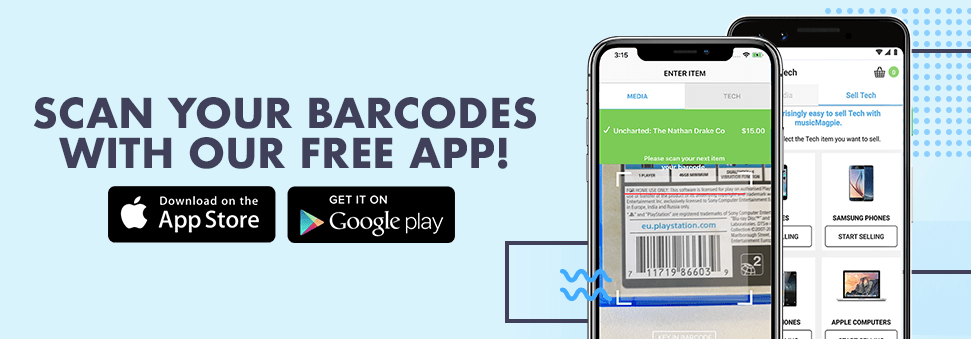


To start selling a CD, just enter the barcode e.g. "711719475828" (without spaces or dashes)




Sell Your CDs
It's easy to sell CDs with musicMagpie
musicMagpie clears the clutter from your home and enables you to make a new start by giving you an easy way to sell CDs. It’s a simple and straightforward way to sell old CDs, so if you think it’s about time to make some extra space, or you’re just looking for a handy way to make extra cash, then musicMagpie can help you recycle CDs.
When the CD came along it caused a bit of a revolution; people didn’t have to fast-forward or rewind to their favourite tracks, instead they were available at the push of a button.
Record companies quickly jumped on the bandwagon and re-released their back catalogue on CD, meaning that a huge selection was quickly available. With such a big selection, people everywhere started building their own CD collections, and today over 200 billion CDs have been sold.
With such huge collections everywhere, we’re bound to have amassed some unwanted ones along the way. Thankfully, there’s an easy way to recycle CDs; with musicMagpie you can make yourself some extra space by decluttering and selling your CDs, and better yet, you’ll earn yourself some extra cash too. We're one of the best places to sell CDs - as many of our customers on Trustpilot will tell you!
Once you’ve entered your unwanted CDs into our easy to use valuation engine, all that’s left to do is send them to us. Just pop your CDs in a box (any box will do) along with the rest of your unwanted stuff then send your items for FREE!
We'll then pay you the same day they arrive. It really is the easiest way to sell old CDs!
ENTERING A BARCODE
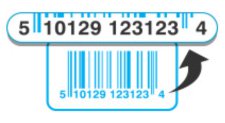
Please enter ALL THE DIGITS for the barcode, without spaces or dashes. (Sometimes there are numbers on the far left and right of the barcode - don't forget these!)
STICKER BARCODES
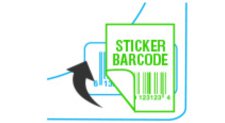
Some CDs, DVDs or Games may have a sticker covering the barcode. You will need to type in the original barcode and NOT the over-stickered shop barcode.

Sell CDs

Sell DVDs

Sell Games