System.ArgumentNullException: Value cannot be null.
Parameter name: source
   at System.Linq.Enumerable.Any[TSource](IEnumerable`1 source)
   at musicMagpie.Basket.Helpers.BasketHelper.AllTechItems() in D:\a\1\s\musicMagpie.Core\Helpers\BasketHelper.cs:line 855
   at ASP._Page_Views_Partials_ContentElements_ProductsSearchForm_cshtml.Execute() in C:\home\site\wwwroot\Views\Partials\ContentElements\ProductsSearchForm.cshtml:line 14
   at System.Web.WebPages.WebPageBase.ExecutePageHierarchy()
   at System.Web.Mvc.WebViewPage.ExecutePageHierarchy()
   at System.Web.WebPages.WebPageBase.ExecutePageHierarchy(WebPageContext pageContext, TextWriter writer, WebPageRenderingBase startPage)
   at Umbraco.Web.Mvc.ProfilingView.Render(ViewContext viewContext, TextWriter writer) in D:\a\1\s\src\Umbraco.Web\Mvc\ProfilingView.cs:line 25
   at System.Web.Mvc.Html.PartialExtensions.Partial(HtmlHelper htmlHelper, String partialViewName, Object model, ViewDataDictionary viewData)
   at ASP._Page_Views_Partials_ContentElements_ProductsSearch_cshtml.Execute() in C:\home\site\wwwroot\Views\Partials\ContentElements\ProductsSearch.cshtml:line 134
   at System.Web.WebPages.WebPageBase.ExecutePageHierarchy()
   at System.Web.Mvc.WebViewPage.ExecutePageHierarchy()
   at System.Web.WebPages.WebPageBase.ExecutePageHierarchy(WebPageContext pageContext, TextWriter writer, WebPageRenderingBase startPage)
   at Umbraco.Web.Mvc.ProfilingView.Render(ViewContext viewContext, TextWriter writer) in D:\a\1\s\src\Umbraco.Web\Mvc\ProfilingView.cs:line 25
   at System.Web.Mvc.Html.PartialExtensions.Partial(HtmlHelper htmlHelper, String partialViewName, Object model, ViewDataDictionary viewData)
   at ASP._Page_Views_MacroPartials_ContentElements_ProductsSearch_cshtml.Execute() in C:\home\site\wwwroot\Views\MacroPartials\ContentElements\ProductsSearch.cshtml:line 21
   at System.Web.WebPages.WebPageBase.ExecutePageHierarchy()
   at System.Web.Mvc.WebViewPage.ExecutePageHierarchy()
   at System.Web.WebPages.WebPageBase.ExecutePageHierarchy(WebPageContext pageContext, TextWriter writer, WebPageRenderingBase startPage)
   at Umbraco.Web.Mvc.ProfilingView.Render(ViewContext viewContext, TextWriter writer) in D:\a\1\s\src\Umbraco.Web\Mvc\ProfilingView.cs:line 25
   at Umbraco.Web.Mvc.ControllerExtensions.RenderViewResultAsString(ControllerBase controller, ViewResultBase viewResult) in D:\a\1\s\src\Umbraco.Web\Mvc\ControllerExtensions.cs:line 80
   at Umbraco.Web.Macros.PartialViewMacroEngine.Execute(MacroModel macro, IPublishedContent content) in D:\a\1\s\src\Umbraco.Web\Macros\PartialViewMacroEngine.cs:line 98
   at Umbraco.Web.Macros.MacroRenderer.<>c__DisplayClass17_0.<ExecuteMacroOfType>b__0() in D:\a\1\s\src\Umbraco.Web\Macros\MacroRenderer.cs:line 342
   at Umbraco.Web.Macros.MacroRenderer.ExecuteProfileMacroWithErrorWrapper(MacroModel macro, String msgIn, Func`1 getMacroContent, Func`1 msgErr) in D:\a\1\s\src\Umbraco.Web\Macros\MacroRenderer.cs:line 313
   at Umbraco.Web.Macros.MacroRenderer.ExecuteMacroWithErrorWrapper(MacroModel macro, String msgIn, String msgOut, Func`1 getMacroContent, Func`1 msgErr) in D:\a\1\s\src\Umbraco.Web\Macros\MacroRenderer.cs:line 272
   at Umbraco.Web.Macros.MacroRenderer.ExecuteMacroOfType(MacroModel model, IPublishedContent content) in D:\a\1\s\src\Umbraco.Web\Macros\MacroRenderer.cs:line 339
   at Umbraco.Web.Macros.MacroRenderer.Render(MacroModel macro, IPublishedContent content, IDictionary pageElements) in D:\a\1\s\src\Umbraco.Web\Macros\MacroRenderer.cs:line 245
   at Umbraco.Web.UmbracoComponentRenderer.RenderMacro(IPublishedContent content, String alias, IDictionary`2 parameters) in D:\a\1\s\src\Umbraco.Web\UmbracoComponentRenderer.cs:line 131
   at Umbraco.Web.UmbracoComponentRenderer.RenderMacro(Int32 contentId, String alias, IDictionary`2 parameters) in D:\a\1\s\src\Umbraco.Web\UmbracoComponentRenderer.cs:line 102
   at ASP._Page_Views_Partials_grid_editors_Macro_cshtml.Execute() in C:\home\site\wwwroot\Views\Partials\grid\editors\Macro.cshtml:line 15
   at System.Web.WebPages.WebPageBase.ExecutePageHierarchy()
   at System.Web.Mvc.WebViewPage.ExecutePageHierarchy()
   at System.Web.WebPages.WebPageBase.ExecutePageHierarchy(WebPageContext pageContext, TextWriter writer, WebPageRenderingBase startPage)
   at Umbraco.Web.Mvc.ProfilingView.Render(ViewContext viewContext, TextWriter writer) in D:\a\1\s\src\Umbraco.Web\Mvc\ProfilingView.cs:line 25
   at System.Web.Mvc.Html.PartialExtensions.Partial(HtmlHelper htmlHelper, String partialViewName, Object model, ViewDataDictionary viewData)
   at ASP._Page_Views_Partials_grid_editors_Base_cshtml.Execute() in C:\home\site\wwwroot\Views\Partials\grid\editors\Base.cshtml:line 20




Sell Your Blu-rays
It's easy to sell Blu-rays with musicMagpie
musicMagpie cuts the clutter by letting you sell Blu-ray discs, along with the rest of your unwanted stuff, so if you’re struggling for space, or could just do with a little extra cash then you can sell your used Blu-ray discs with musicMagpie - it’s simple and hassle-free and you can make yourself some extra cash in the process.
Developed by Sony, Blu-ray discs first arrived in 2006 as a response to the rise in popularity of high definition TVs. With DVDs no longer being able to boast having the best picture quality when it came to home entertainment, the popularity of the Blu-ray soon took off thanks to their higher capacity which meant they could hold far more content than the average DVD.
Skip forward to today and Blu-rays are everywhere with an endless choice of titles. Unfortunately, they can’t all be great and it’s quite likely that we’ve all got a few titles that would serve us better as cash - or sometimes it's just a case of having watched them one too many times. That’s where musicMagpie comes in; we’re one of the best places to sell Blu-rays!
Selling Blu-rays with us is easy: once you've entered your Blu-rays into our easy to use valuation engine, just pop them in a box - any box - along with the rest of your unwanted stuff and then send them for FREE. Thanks to our Fast Same Day Payments, you'll get paid for your Blu-ray trade in the same day your items arrive. It really is that easy to trade in Blu-ray discs!
ENTERING A BARCODE
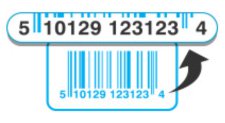
Please enter ALL THE DIGITS for the barcode, without spaces or dashes. (Sometimes there are numbers on the far left and right of the barcode - don't forget these!)
STICKER BARCODES
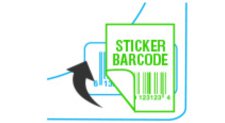
Some CDs, DVDs or Games may have a sticker covering the barcode. You will need to type in the original barcode and NOT the over-stickered shop barcode.

Sell CDs

Sell DVDs

Sell Games