System.ArgumentNullException: Value cannot be null.
Parameter name: source
   at System.Linq.Enumerable.Any[TSource](IEnumerable`1 source)
   at musicMagpie.Basket.Helpers.BasketHelper.AllTechItems() in D:\a\1\s\musicMagpie.Core\Helpers\BasketHelper.cs:line 855
   at ASP._Page_Views_Partials_ContentElements_ProductsSearchForm_cshtml.Execute() in C:\home\site\wwwroot\Views\Partials\ContentElements\ProductsSearchForm.cshtml:line 14
   at System.Web.WebPages.WebPageBase.ExecutePageHierarchy()
   at System.Web.Mvc.WebViewPage.ExecutePageHierarchy()
   at System.Web.WebPages.WebPageBase.ExecutePageHierarchy(WebPageContext pageContext, TextWriter writer, WebPageRenderingBase startPage)
   at Umbraco.Web.Mvc.ProfilingView.Render(ViewContext viewContext, TextWriter writer) in D:\a\1\s\src\Umbraco.Web\Mvc\ProfilingView.cs:line 25
   at System.Web.Mvc.Html.PartialExtensions.Partial(HtmlHelper htmlHelper, String partialViewName, Object model, ViewDataDictionary viewData)
   at ASP._Page_Views_Partials_ContentElements_ProductsSearch_cshtml.Execute() in C:\home\site\wwwroot\Views\Partials\ContentElements\ProductsSearch.cshtml:line 134
   at System.Web.WebPages.WebPageBase.ExecutePageHierarchy()
   at System.Web.Mvc.WebViewPage.ExecutePageHierarchy()
   at System.Web.WebPages.WebPageBase.ExecutePageHierarchy(WebPageContext pageContext, TextWriter writer, WebPageRenderingBase startPage)
   at Umbraco.Web.Mvc.ProfilingView.Render(ViewContext viewContext, TextWriter writer) in D:\a\1\s\src\Umbraco.Web\Mvc\ProfilingView.cs:line 25
   at System.Web.Mvc.Html.PartialExtensions.Partial(HtmlHelper htmlHelper, String partialViewName, Object model, ViewDataDictionary viewData)
   at ASP._Page_Views_MacroPartials_ContentElements_ProductsSearch_cshtml.Execute() in C:\home\site\wwwroot\Views\MacroPartials\ContentElements\ProductsSearch.cshtml:line 21
   at System.Web.WebPages.WebPageBase.ExecutePageHierarchy()
   at System.Web.Mvc.WebViewPage.ExecutePageHierarchy()
   at System.Web.WebPages.WebPageBase.ExecutePageHierarchy(WebPageContext pageContext, TextWriter writer, WebPageRenderingBase startPage)
   at Umbraco.Web.Mvc.ProfilingView.Render(ViewContext viewContext, TextWriter writer) in D:\a\1\s\src\Umbraco.Web\Mvc\ProfilingView.cs:line 25
   at Umbraco.Web.Mvc.ControllerExtensions.RenderViewResultAsString(ControllerBase controller, ViewResultBase viewResult) in D:\a\1\s\src\Umbraco.Web\Mvc\ControllerExtensions.cs:line 80
   at Umbraco.Web.Macros.PartialViewMacroEngine.Execute(MacroModel macro, IPublishedContent content) in D:\a\1\s\src\Umbraco.Web\Macros\PartialViewMacroEngine.cs:line 98
   at Umbraco.Web.Macros.MacroRenderer.<>c__DisplayClass17_0.<ExecuteMacroOfType>b__0() in D:\a\1\s\src\Umbraco.Web\Macros\MacroRenderer.cs:line 342
   at Umbraco.Web.Macros.MacroRenderer.ExecuteProfileMacroWithErrorWrapper(MacroModel macro, String msgIn, Func`1 getMacroContent, Func`1 msgErr) in D:\a\1\s\src\Umbraco.Web\Macros\MacroRenderer.cs:line 313
   at Umbraco.Web.Macros.MacroRenderer.ExecuteMacroWithErrorWrapper(MacroModel macro, String msgIn, String msgOut, Func`1 getMacroContent, Func`1 msgErr) in D:\a\1\s\src\Umbraco.Web\Macros\MacroRenderer.cs:line 272
   at Umbraco.Web.Macros.MacroRenderer.ExecuteMacroOfType(MacroModel model, IPublishedContent content) in D:\a\1\s\src\Umbraco.Web\Macros\MacroRenderer.cs:line 339
   at Umbraco.Web.Macros.MacroRenderer.Render(MacroModel macro, IPublishedContent content, IDictionary pageElements) in D:\a\1\s\src\Umbraco.Web\Macros\MacroRenderer.cs:line 245
   at Umbraco.Web.UmbracoComponentRenderer.RenderMacro(IPublishedContent content, String alias, IDictionary`2 parameters) in D:\a\1\s\src\Umbraco.Web\UmbracoComponentRenderer.cs:line 131
   at Umbraco.Web.UmbracoComponentRenderer.RenderMacro(Int32 contentId, String alias, IDictionary`2 parameters) in D:\a\1\s\src\Umbraco.Web\UmbracoComponentRenderer.cs:line 102
   at ASP._Page_Views_Partials_grid_editors_Macro_cshtml.Execute() in C:\home\site\wwwroot\Views\Partials\grid\editors\Macro.cshtml:line 15
   at System.Web.WebPages.WebPageBase.ExecutePageHierarchy()
   at System.Web.Mvc.WebViewPage.ExecutePageHierarchy()
   at System.Web.WebPages.WebPageBase.ExecutePageHierarchy(WebPageContext pageContext, TextWriter writer, WebPageRenderingBase startPage)
   at Umbraco.Web.Mvc.ProfilingView.Render(ViewContext viewContext, TextWriter writer) in D:\a\1\s\src\Umbraco.Web\Mvc\ProfilingView.cs:line 25
   at System.Web.Mvc.Html.PartialExtensions.Partial(HtmlHelper htmlHelper, String partialViewName, Object model, ViewDataDictionary viewData)
   at ASP._Page_Views_Partials_grid_editors_Base_cshtml.Execute() in C:\home\site\wwwroot\Views\Partials\grid\editors\Base.cshtml:line 20
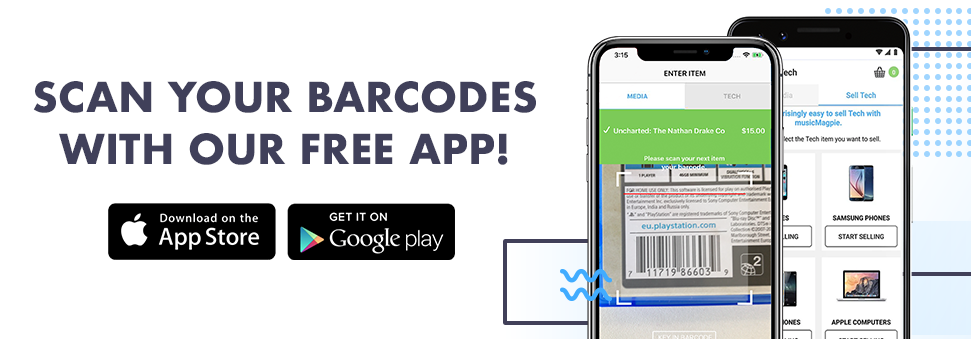



To start selling your Textbooks, enter the barcode e.g. "711719475828" (without spaces or dashes)



Sell Your Textbooks
It's easy to sell textbooks with musicMagpie!
No matter what you study at university or college, the chances are you’ll need to buy a couple of textbooks. But what should you do with those books when you’ve completed your course or you’re moving onto your next term and have even more textbooks to buy?
musicMagpie is a quick and easy way to sell textbooks online. First, get an instant price. Then, send them for FREE and we’ll pay you the same day they arrive.
Textbooks are essential for most courses. They aren’t cheap though, and you won’t get much use out of them after graduation either. If you’re still in uni, you might need to buy even more textbooks next year. It’s not always easy to sell used textbooks though; you have to find a buyer, get a good price and then worry about delivery and fees too. We take away all that stress!
How to sell textbooks
To sell used textbooks (and new ones too!), simply get an instant price using our valuation engine. Alternatively, you can scan the barcode on your books using our FREE Android or iPhone app. You can sell CDs, DVDs, Games, Mobile Phones and Tech at the same time too!
Next, pop all of your books and anything else you’re selling into any box you like, then send it using one of our fantastic FREE send options.
Thanks to our Fast Same Day Payments, we’ll pay you on the same day your order arrives by Bank Transfer, PayPal or Cheque. You can also donate your total order value to charity. Why wouldn't you sell old textbooks with musicMagpie?
ENTERING A BARCODE
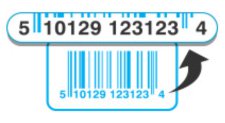
Please enter ALL THE DIGITS for the barcode, without spaces or dashes. (Sometimes there are numbers on the far left and right of the barcode - don't forget these!)
STICKER BARCODES
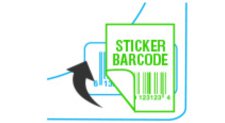
Some CDs, DVDs or Games may have a sticker covering the barcode. You will need to type in the original barcode and NOT the over-stickered shop barcode.

Sell CDs

Sell DVDs

Sell Games